Secure Secret Management in Git with SOPS
Secure Secret Management in Git with SOPS
Managing credentials and secrets in collaborative projects is a common challenge. Whether dealing with API keys, database passwords, or configuration files, you need a secure way to share them with team members and deployment systems without exposing sensitive data.
What if you could keep your secrets encrypted directly in your Git repository while maintaining fine-grained access control?
This article introduces a practical solution using SOPS and Age - two powerful tools that provide secure, encrypted secret management that integrates seamlessly with your existing Git workflow.
What are SOPS and Age?
SOPS (Secrets OPerationS) is an editor for encrypted files that supports YAML, JSON, ENV, INI and BINARY formats and encrypts them with AWS KMS, GCP KMS, Azure Key Vault, age, and PGP.
Age is a simple, modern, and secure encryption tool that uses public-key cryptography. It is designed for ease of use while maintaining strong security. SOPS can use Age as one of its encryption backends.
Asymmetric encryption
Before diving in, let’s recap the encryption method we’ll use. Asymmetric encryption (or public-key cryptography) uses a pair of mathematically related keys:
- Public key: Used to encrypt data. It can be safely shared.
- Private key: Used to decrypt data. It must be kept secret.
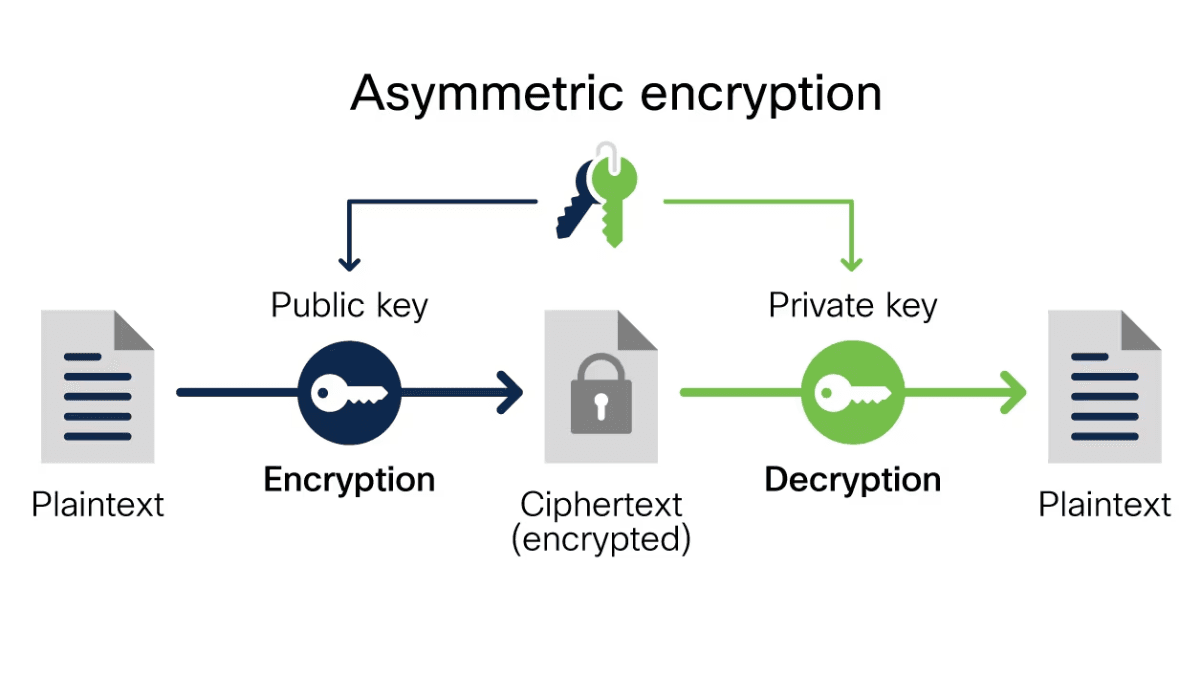
In our setup, we’ll use your existing SSH key pair. This approach has several advantages:
- No extra key management: You already use SSH keys for Git access.
- Familiar workflow: Developers are comfortable with SSH key management.
- Secure by design: SSH keys use strong cryptographic algorithms.
- Easy distribution: Public keys are easily shared via GitHub or other platforms.
When you encrypt a file with SOPS using an SSH public key, only someone with the corresponding private key can decrypt it. This allows you to safely commit encrypted files to your Git repository without exposing sensitive information.
Let’s set up this system step by step.
How-to
Install sops
Follow the official docs at getsops.io or use the following snippet for Linux environments:
# Get the latest version
VERSION=$(curl -s https://api.github.com/repos/getsops/sops/releases/latest | jq -r '.tag_name')

# Download the binary
curl -LO https://github.com/getsops/sops/releases/download/$VERSION/sops-$VERSION.linux.amd64

# Move the binary into your PATH
sudo mv sops-$VERSION.linux.amd64 /usr/local/bin/sops

# Make the binary executable
chmod +x /usr/local/bin/sops
Sops configuration file with a ssh key
The .sops.yaml file tells SOPS which encryption keys to use for different files in your repository. It allows you to define rules based on file paths, so you can use different keys for different services or environments.
cat <<EOF > .sops.yaml
creation_rules:
  - path_regex: .*
    age: "$(ssh-keygen -y -f ~/.ssh/id_rsa)"
EOF
When decrypting,
sopswill automatically look for the corresponding private SSH key in~/.ssh/id_ed25519and fall back to~/.ssh/id_rsa. You can also specify a custom path to your private key by setting theSOPS_AGE_SSH_PRIVATE_KEY_FILEenvironment variable.
Encrypt a file
sops encrypt service-a/.env.local > service-a/.env.local.encDecrypt a file
sops decrypt service-a/.env.local.enc > service-a/.env.localRemember to add unencrypted credential files to your .gitignore.
The resulting .enc files can be safely committed to Git or distributed through other internal channels like email or chat.
What’s Next?
This guide covered the basics of using SOPS with Age and SSH keys. However, SOPS offers many more advanced features for enterprise environments:
- Cloud Integration: Use AWS KMS, Google Cloud KMS, Azure Key Vault or Hashicorp Vault for key management.
- Hardware Security Modules: Use YubiKey or other hardware tokens for key storage.
- Audit Logging: Track who accessed which secrets and when.
For more information and advanced configurations, check out the SOPS documentation and Age documentation .